Showing posts with label COMPUTER - Software. Show all posts

Tuesday, January 5, 2010

Praktek Buruk Perusahaan Best Buy

Ini adalah kasus kesekian kalinya tentang ketidakberesan servis komputer. Yang terbaru adalah kasus tentang Best Buy (perusahaan lokal besar di Amerika). Best Buy mengharuskan semua pelanggannya untuk membeli paket optimasi seharga $40. Singkat cerita setelah diselidiki apa yang mereka lakukan hanyalah hal-hal biasa dan tidak meningkatkan performa.


Lebih lanjut dan detail dapat dibaca di Neowin.

Saturday, December 12, 2009

Software Review: Picasa 3.6 Face Recognition

The face recognition can be think as PC evolution. It just like when PC still 2D to 3D. Till today people is still having a hard way searching something beside text in the computer. Although text is the oldest data form in computer, many other data has quite old. WAV is has been in 1980, MP3 1997, JPG 1994, and may others. Two the last one is still popular till now.  In near 2010 we still hardly able to search MP3 and JPEG. What I mean here is searching the data file not the tag, the internet, filename, etc. Example you record a song to mp3. Can you search the certain words in that mp3? Can you search picture something in your jpg?


Picasa is a free software from Google. Picasa is originally a software company like ACDSEE that has been bough by Google. Total review of a Picasa is beyond of this article. I only focus on face recognition part. Starting to Picasa 3.5, Google has been added Face Recognition ability that has been on the Picasa Online quite sometime. If shareware count then the first software for mass PC Face recognition was Cyberlink MediaShow 5. Picasa is second in PC, but first in FREE. Both of them is the second and third if Apple IPhoto 2009 include. Does the Picasa served the best? This article also not about comparing three mass software face recognition. So let’s begin.


First time Picasa is trying to search face of all of your picture. Than after that it is trying to match / group the faces that is found from your photo. The face recognition is quite good. The only two draw back in face recognition. First Picasa is unable to recognize the face on rotate photo. The photo must have a face that has 2 eyes on the top, a nose bellow, a mouth at bottom. If the photo is rotate like the eyes in the left, the nose is in the middle, and the mouth is on the right than it will ignore by Picasa. The second draw back is a bit irritating. It just like the first bug. But the first bug, the face rotate by pretty degree like 90, 180, 270. Unfortunate event a small degree of a face rotation will make Picasa failed to recognize a face. The example of those case are in the picture 1. In the picture 1, Hu Ge is just rotate his head few degree. This small rotation make Picasa failed to auto recognize the Hu Ge face.


PicasaUnknown

Picture 1. The Picasa Unrecognized


The extreme case of Picasa is like this. You have 1.000 file of your model. Fortunately your model face is just normal straight forward (eyes in the top, mouth in the bottom). You are experimenting many style but the face is just normal. All you have to do is just create a new name of your model. Picasa will suggest 999 face of the same model. You just click confirm all. That’s it! Instead of the old time tagging 1000 file with a model name (perhaps there is a batch process to do so). The worst case one is you have to create a box that contain her / his face and name them. Do this for each file for 1.000 times. Normal case will be something like picture 2.

PicasaFaceGroup

Picture 2. The Picasa Normal Case of Face Recognition.


Do you know back then why people are afraid to use a program? One of the cause is the computer program is not trustable in people mind (easy to forge data). The second biggest reason is support of the file format. What is the use of good program when your hard work can’t be save? Event more trapping is the file format for your hard work can’t be open in few years latter. These two main reasons is something to put in your mind where you use a new unknown program. This is also happen with the first time of Word Processor program like Word, Lotus, Wordstar, etc. Back to Picasa. If you have spend a few months tagging thousand photo (you have a life, you just tag photo one hour a day), how can you save your hard work in Picasa? I will give my tips in this article later.


In the making of this article there has been out Picasa 3.6 which as many new feature. On of them that I like most is now Picasa suggest people everywhere. Not just in the contact / people like in Picasa 3.5. Picasa 3.6 has been more like Picasa Online when we want to rename a face it will suggest a name. See picture 3, 4, and 5.

Picasa_New_3.6

Picture 3. Picasa 3.6 Suggest name in the Folder Name.

Picasa_New_3.6_2

Picture 4. Picasa suggest name in the Unnamed People.

Picasa_New_3.6_3

Picture 5. Picasa 3.6 Suggest name in the Unnamed People.


The second new in Picasa 3.6 that like is the progress process. It appear in the Picture 5 in the middle top. It says 216 groups, 21100 faces, 2393 to scan, 00:47:32 time remaining. We now know that Picasa need 47 minutes to scan the remaining 2393 faces. Not like older Picasa where we just wait till it finish. There are also one feature that I suggest but unable to test if this feature has been implemented in this version of Picasa. It was the GPU usage. The Cyberlink MediaShow 5 has able to take advantaged of the GPU processing. I just can’t wait this feature implemented in Picasa to speed up the face scanning process.


Here is a tips for making Picasa more portable:

1. Share your picture in a network, example to \\COMPUTERNAME\PHOTO.

2. Map the number 1 to a drive, best is Z. So Z: is the map of \\127.0.0.1\PHOTO. Use Windows Explorer, select from menu Tool – Map Network Drive.

3. Disable all folder that Picasa scan except for drive Z.

4. Wait the Picasa to scan the entire drive Z.

5. Tag the faces that Picasa found.

6. To survive the Windows Reinstall you must save the number 4 and 5 data. Go to C:\Users\YourUserName\AppData\Local or something similiar. Make sure you have done the number 4 and 5, if not there is nothing to save. Copy the Google folder to difference place in your harddrive, example D:\DATA\GOOGLE. Go to Z:. Find files picasa.ini. Use Winrar / Winzip / something similiar to archive them. Make sure you save the directory setting, because all file has the same filename Picasa.ini.

7. If you want to restore the picture to another computer or after reinstalling Windows than this is the way. Do number 1 – 2 above. Install latest Picasa. Copy the Google folder that you save in step 6 (the point is just reverse the step 6) to C:\Users\YourUserName\AppData\Local or something similiar. Do the step 3 and 4. Done. All just back to before.


This is a real case to me with Picasa. I have a Dell Latitude D630 with Intel Core 2 Duo T7250 and 4 GB memory with 80 GB HDD 7200 rpm. My main PC is Sempron 2800+ 1,6 Ghz with only 1,5 GB RAM. My photos is about 42,6 GB with about 27,000 files. I need a faster processor to make face recognition faster. If my laptop HDD is 160 / 250 / 320 / 500 GB than I just use the step 1 – 7 above. To make thing more complicated, I have been use the older build of Picasa in My PC. My mission here is to re-recognize (I don’t quite spending a lot of time with older Picasa, but I intend to do with this Picasa) faces in my Photo, back it up, and restore to my PC with the final data. In analogy with Microsoft Word, I just create delete my old document. Create it on a difference PC. And copy the .docx file.


So here is what you do. First copy the photos file from PC to Laptop. To make time more efficient, I delete the movie and the picture folder that I know doesn’t contain face. The example of it is the screenshot of a program, the hardware photos, etc. That save about 10 GB more, so my photo folder is about 30 GB. Next I delete the picasa.ini in my photo folder to refresh a new face recognition data. After waiting about 1 week with about 16 hours a day, Picasa has been done scanning faces. The same amount was also time to take in My PC with overclock Sempron to 2 GB (stack clock is 1,6 Ghz). Why the laptop is not faster? Because in the PC I use the default setting for face recognition accuracy that is 80. In my laptop I use the highest and slowest setting that is 95. The lowest setting is 55, see Picture 6.

PicasaSetting

Picture 6. Picasa Name Tag Setting. 


When I move the slider in picture 6 far away to the left (55) than I get suggest more than 10,000 photos for a person. The opposite also true, when I move the slider to the right most (95), I get very accurate person suggestion. But moving the slider to the right most will make the scan super slow. I think that the reason why Google not set the default setting to 95. The other reason maybe that using the setting 95 will also miss the same person to be suggest.


Now than, what the use of Picasa when you have all the person you know tagged? You can search. You can search a photos that contain Hu Ge (The Actor that play Guo Cing from Legend of The Condor Heroes 2008), Ariel Lin (Huang Rong from the save movie), and Mu Nian Ce (A Role name in LOCH 2008). The first thing is to select one of them. Example Ariel Lin like in the picture 7.


Ariel_Lin

Picture 7. Ariel Lin (The Actress that play Huang Rong from Legend of The Condor Heroes 2008)


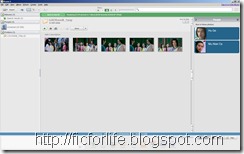
You notice that in the right (People Tab) there is two other people, Hu Ge and Mu Nian Ce. Select Hu Ge to search a photos that contain at least Hu Ge and Ariel Lin. Same with picture 7, the result will have Mu Nian Ce in the right. Select it and you will have a photos that contain Hu Ge, Ariel Lin, and Mu Nian Ce like in the picture 8.
 

Picasa_Search

Picture 8. Drill Down Face Search in Picasa


You can use this feature to search photos that contain your family like mother, father, sister, and brother. The only thing that is inconsistent to me is the “Back to View All Button”. I often to click the Import Button to back. I get use to Windows Vista and later Windows 7 design that back is on the left top. I still don’t know how to select a Photo that contain ONLY a certain person, not AT LEAST. The second use of Picasa if you a model photographer or a designer. You can choose a model and pick the right pose before you process it a lot further using Photoshop. You can use Zoom out to see the pose instead of the face. Click the small icon. See Picture 7, the icon is on the middle upper right that has the picture of a box with 4 arrows form the center trying to go out. 


Tips to efficiently tagging the face in Picasa. First wait for Picasa to recognize all the picture. Although you can tagging while Picasa searching faces, it will be not efficient to do so. Because many good picture / photos hasn’t been find by Picasa. After Picasa finish searching faces, here is the way to efficiently tagging faces. Go to your photo folder that contain a person hi res photo you want to take. Tag it, give the face a name. Do the same thing for all person you care / know. Make sure you use hi resolution photo at first. Then wait for Picasa to suggest more matching faces. After no more suggestion this is the finishing step. Browse you folder want by one like you want to remember them. Check the tag, and tag the faces that are not straight. Do that for all picture. Done.  


To warp things up Picasa is a good one. The improvement that I suggest is:

1. Use GPU.

2. Find ONLY a photo with people not AT LEAST.

3. Create a small simple statistic graph. Like 90% of my picture is tagged and 10% is unnamed. Of that 90%, 40% is ignore. The rest 50%, the most 10 ten faces that I tag is. Do that in simple chart graph.

4. Easy to save data. There is a person backup. I don’t know if this is the function to backup data. I need the data only. Not include the original photos.

5. Easy to synchronize not only with Google Account or Picasa web, but with other Picasa.

6. Make more less strict but accurate face recognition.

7. Able to save data from face recognition from optical drive without copying all the photos.


I Hope this is helpful :). Any question? Just posted in the comment.

Wednesday, October 14, 2009

Realtek HD Audio Driver Versi 2.35

Realtek telah mengeluarkan driver terbaru untuk audio HD mereka versi 2.35.

Dapatkan disini.

Saya senang dengan Realtek karena vendor ini termasuk salah satu vendor yang paling rajin mengupdate driver. Oh iya seperti biasa tiap-tiap driver sebesar 30 MBan terdiri dari 2 jenis yaitu untuk 2000 + XP dan Vista + Windows 7. Untuk Realtek driver 32 dan 64 bit jadi satu.

Adobe Acobat Reader 9.20 + Adobe Acrobat 9.20 Patch

Adobe telah mengeluarkan Arobat Reader versi terbaru yaitu versi 9.20. Disamping itu pula Adobe juga mengeluarkan patch untuk versi berbayar ke 9.20. Dapatkan semuanya dibawah ini:

Adobe Arobat Reader 9.20 (26 MB)

Adobe Arcobat 9.20 Incremental Patch (165 MB)

[lagi males ah pokoknya ingat kata2ku yang dulu. Selamat berusaha download 165 MB untuk yang memiliki Adobe Acrobat dan 36 MB untuk readernya].

Sunday, October 11, 2009

Hati-hati Membeli VGA Onboard ATI

Alasannya karena dukungan drivernya buruk. Saya menggunakan Gigabyte GA-MA69G-S3H dengan chipset ATI 690G. ATI 690G ini merupakan renamean dari Ati Radeon X700 yang direname menjadi Radeon X1250. Langkah-langkah mendapatkan driver terbaru:

1. Buka http://support.ati.com. Nanti akan diridirect ke situs AMD (AMD sudah lamaaaaa membeli ATI).

2. Klik Graphic Driver. Pilih Windows Vista X64 –> Integrated IGP –> X1250. Maka anda akan tiba kesini.

Di halaman itu intinya ATI mengatakan bahwa banyak produk mereka termasuk Radeon X1250 ini yang dikategorikan sebagai barang kuno (legacy product). Daftar barang kuno ATI adalah:

ATI Radeon 9500 Series
ATI Radeon 9550 Series
ATI Radeon 9600 Series
ATI Radeon 9700 Series
ATI Radeon 9800 Series
ATI Radeon X300 Series
ATI Radeon X550 Series
ATI Radeon X600 Series
ATI Radeon X700 Series
ATI Radeon X800 Series
ATI Radeon X850 Series
ATI Radeon X1050 Series
ATI Radeon X1300 Series
ATI Radeon X1550 Series
ATI Radeon X1600 Series
ATI Radeon X1650 Series
ATI Radeon X1800 Series
ATI Radeon X1900 Series
ATI Radeon Xpress Series
ATI Radeon X1200 Series
ATI Radeon X1250 Series
ATI Radeon X2100 Series

Mungkin anda bertanya, terus kanapa? Jawabannya karena beberapa dari barang itu termasuk baru. Baru dalam hal ini adalah baru satu atau dua tahun muncul. Dalam keadaan normal dukungan hardware minimal 5 tahun. Untuk kelas bisnis bahkan bisa 10 tahun atau lebih. Masalahnya kalau ini perusahaan lokal Indonesia yang baru masuk pasar sih aku cuma bisa bilang salah sendiri beli kok barang perusahaan kecil. Tapi ini ATI AMD. AMD adalah perusahaan mikroprosesor X86 terbesar kedua setelah Intel.

Terus kenapa kalau barang baruku dimasukkan sana? Jawabanya karena anda tidak akan mendapatkan driver update baru. Kalau tidak ada driver baru artinya anda tidak akan mendapatkan fitur baru maupun berbaikan bug. Anda bisa saja menginstall Catalyst 9.9 terbaru (sebentar lagi keluar 9.10) yang dengan susah payah dan lama anda download dengan “The new and Improved” Real “HSDPA” 6 KB/s Telkomsel Flash Unlimited yang limited itu. Tapi tidak ada penambahan fitur maupun perbaikan bug.

Yang lebih mengerikan lagi, AMD tidak mendukung produk ini untuk Windows 7.  Berikut ini adalah kutipannya:

AMD may periodically provide Windows XP and Windows Vista driver updates (for the products listed above) for critical fixes only.  No new features will be provided in future driver updates.  The Linux ATI Catalyst™ driver will only be supported in Linux distributions prior to February 2009 for the legacy products listed above.

Any customers using a combination of a ATI Radeon™ HD 2000 Series, ATI Radeon™ HD 3000 Series, or ATI Radeon™ HD 4000 Series product with any of the legacy products listed above in a single PC system must use the ATI Catalyst 9.3 or earlier driver.   All future ATI Catalyst™ releases made available past the ATI Catalyst™ 9.3 release will not include support for the legacy products listed above or any of the features associated with those legacy products.

Note: AMD’s DirectX 9 ATI Radeon graphics accelerators are not officially supported under Windows 7.   If the user chooses to, they can install the ATI Catalyst Windows Vista graphics driver under Windows 7.   Please be aware that none of the new Windows 7 graphics driver (WDDM 1.1) features are supported (as the Windows Vista level graphics driver is limited to WDDM 1.0 level support).  Using the ATI Catalyst Windows Vista driver under Windows 7 is not officially supported by AMD, and as such AMD will not provide any form of customer support for users running in this configuration

Bagi anda yang berpikir ah itu sih biasa. Semua juga gitu. SALAH BESAR! Kompetitor utama AMD yaitu NVIDIA tetap mendukung motherboard dengan chipset Geforce 6100. Saya telah memiliki motheboard Biostar TForce T6100 dan drivernya masih didukung sampai sekarang. Untuk VGA Nvidia masih mendukung Geforce 6 – GT 3xx (aka Geforce 12).

Nero 9 Baru 9.4.26.0

Nero 9 telah mengeluarkan versi terbarunya yaitu Nero versi 9.4.26.0. Dalam versi baru ini terdapat beberapa perbaikan. Jika anda ingin mencoba silahkan download di website Nero. Atau bagi anda yang telah membeli Nero 9 seharga $80 anda bisa mengupdate Nero 9 anda juga.

Nero 9 dapat didownload disini:

Nero 9 (9.4.26.0) (hampir 200 MB)

Jika directlink diatas gagal silahkan ke websitenya Nero di:

Nero Trial

Nero Trial di Softpedia

Jika anda menggunakan “The New and Improved” Real “HSDPA” 6KB/s  Telkomsel Flash Unlimited yang limited itu maka silahkan habiskan waktu anda selama 200 MB * 1024 KB / 6 KB/s = 34133,33333333333 detik atau sekitar 9 jam 30 menit hanya untuk download  sebuah NERO.

Wednesday, October 7, 2009

PowerDVD 9 Ultra Patch 2201

Saya merasa PowerDVD 9 merupakan PowerDVD yang paling banyak di patch dalam sejarah PowerDVD. Setidaknya sudah 5 patch masing-masing 100 MB lebih. Ini adalah patch terbaru untuk PowerDVD 9 Ultra (bukan PowerDVD 9 biasa, Deluxe, atau yang lain).

Download Here. (100 MB lebih)

Mari bermain sedikit matematika. Dengan “The New And Improve” Real (wis gak JaIm / Jaga Image) Telkomsel Flash Unlimited yang limited itu maka patch Power Dvd 9 Ultra ini akan selesai dalam waktu:

100 MB * 1024 KB / 6 KB/s = 17067 detik = 4,74 jam.

Bayangkan saja kita sudah membeli PowerDVD 9 Ultra senilai $80. Kemudian bayar Telkomsel Flash yang 6x BICMAC dan 6x lebih mahal dari kompetitor (Smart 45 ribu unlimited 153 Kb/s) itu kita harus menghabiskan waktu lebih dari 4,5 jam. Kalau dikurangi tidur 8 jam itu artinya 30% waktu dalam satu hari habis untuk download patch ini.

Dalam 30% itu kita tidak bisa melakukan apa2. Login YM aja pasti tidak kuat. Apalagi buka Facebook dan lain-lain. Gak habis pikir di tahun 2009 yang hampir 2010 ini masih ada 6 KB/s internet. DAN INI HANYALAH PATCH 1 PROGRAM. Belum Windows Update, Office Update, Java Update, dll. Padahal ini gak gila download. Tapi sudah otomatis bagi end user biasa. Seratus persen tidak download film, tidak membajak program. Cuma program yang sudah ada melakukan update secara otomatis via internet. Lah kalau SDAT Mcafee saja sudah 110 MB lebih masa patch 100 MB = besar?

Kalau unlimited 10 ribu / bulan 6 KB/s mungkin masih dapat dimaklumi. Analoginya seperti mau ke luar negeri naik:

- Becak

- Sepeda Pancal

- Jalan

Padahal yang benar dan normal tentu saja naik pesawat.

Tuesday, October 6, 2009

Mendownload Driver Nvidia Terbaru Dengan “The New and Improved” Real Telkomsel Flash Yang Limited itu

Hari ini telah keluar forceware baru versi 191.07. Berikut ini adalah link downloadnya:

Windows 2000 / XP / 2003 / R2 32 bit (84 MB)

Windows XP / 2003 / R2 64 bit (98 MB)

Windows Vista / 7 32 bit (102 MB)

Windows Vista / 7 64 bit (123 MB)

Total = 403 MB.

Anda pasti berpikir gila apa download untuk semua OS? Jawabannya tidak. Semua OS masuk akal, kecuali Windows XP 64 bit. Satu keluarga memiliki satu komputer adalah wajar. Tiap komputer memiliki OS yang berbeda adalah wajar. PC si ayah yang lama karena dipakai kantor saja menggunakan kemputer lama dengan OS XP dan Geforce 7 sudah cukup. Si anak yang masih butuh mencari hiburan, ngegame, dan melihat ensiklopedia 3D, menggunakan PC Core 2 Duo dengan Geforce GTX 260 dan OS Windows 7 64 bit. Si Ibu dia biasa-biasa aja. Karena pcnya baru beli tahun lalu, dia mendapatkan OS Vista 32 bit dan mengunakan Geforce 8500 GT.

Tapi si Adik paling parah, dia suka ganti-ganti mencoba OS di laptopnya. Karena VGA laptop beda driver dengan VGA dekstop. Maka si Adik harus mendownload 403 MB driver lagi. Total 806 MB driver.

Ingat! Ini hanya driver VGA. Driver hardware tidak hanya VGA. Jadi dengan quota unlimited “The new and Improved” Real Telkomsel Flash Unlimited yang limited 500 MB 8 KB/s itu hal ini sangat berat. Entah kenapa kok bisa dibuat aturan aneh tapi nyata seperti itu?!?!?!

Sunday, October 4, 2009

Solusi Sementara Sublight untuk Digunakan Di “The New and Improved” Telkomsel Flash Unlimited yang Limited itu

Jadi ingat 10 tahun yang lalu. Saat itu masih terjadi pertarungan sengit antara GUI dan Command Prompt. Masing-masing saling mengatakan bahwa mereka lebih unggul. Pada 10 tahun yang lalu website masih ringan-ringan. Command prompt juga masih banyak digunakan.

Solusinya adalah menggunakan Command Prompt. Pastikan anda menjalankan command prompt mode Administrator. Kemudian pastikan juga firewall anda sudah mengijinkan Sublight.cmd.exe. Kemudian ketik ini pada command prompt:

SublightCmd download "Path + Judul film.avi" "en"

Kalau error silahkan menuju C:\Program Files (x86)\Sublight.

Misalkan contohnya:

C:\Program Files (x86)\Sublight>SublightCmd download "C:\Filmku_Hok.avi" "en"


Downloaded subtitles:
C:\Filmku_Hok.1.en.srt

Kalau masih ada error pastikan 3 hal diatas terpenuhi semua, yaitu: Administrator, Firewall, path sublighcmd. Kalau masih error lagi pastikan path + nama file film yang anda masukkan benar. Kalau masih tidak bisa tergantung pesan errornya. Bisa juga karena filmnya terlalu baru sehingga belum ada subtitlenya. Atau yang terakhir karena memang filmnya tersebut tidak terkenal. Misalkan film ulang tahunnya teman anda. Kalau itu sih buat sendiri subtitlenya.

Semoga bermanfaat.

Wednesday, September 23, 2009

World First Offline Free PC Face Recognition Program: Picasa 3.5

Today Google launch Picasa 3.5. One of the most new feature is face recognition. Unlike the Picasa 3.0 where we have online to use the face recognition feature, Picasa 3.5 can do it offline. Meaning Picasa 3.5 can do face recognition on the pc that not connected to the Internet.

While the first offline pc recognition was Cyberlink MediaShow 5, but MediaShow 5 is not free. I haven’t try the MediaShow. I just trying the Picasa but it take a long time to get people face out of my few GB picture.

Picasa3.5

Picture 1. People Section in Picasa 3.5

I really love this feature in the picture 1. The black rectangle is just a censorship of some friends. As you can see in the picture one Picasa 3.5 can also group the near same person. This is very useful if you have thousand picture with near same pose of the same person. Picture 1 is about a virtual album consisting the people. In the picture one case there are SIS picture album. The checkmark in picture 1 is the one that Picasa suggest the face match to the person of the album owner.

Picasa3.5_2

Picture 2. Unname People Tab

Picasa can group some people in the people group like in the picture 2. In this unnamed people tab you can tag a group of people that according to Picasa is the same person. So that you don’t need to tag all manually each photo file.

Picasa3.5_3

Picture 3. Person Contain in a Photo

Last but not least, Picasa 3.5 can also like Facebook which one album is contain many people like in Picture 3. There is only one problem left. If I manage to tag 1.000 time to my 1.000.000 photo, how do I backup it when I am reinstall the Windows?

Wednesday, August 26, 2009

Tip Melihat Pemakaian Bandwidth Internet untuk Setiap Applikasi

Sebulan terakhir ini Telkomsel telah melakukan apa yang dibawah janji mereka. Mereka menjanjikan worst case mendapatkan 64 kbps. Artinya kalau dapat bahasa Flashget dan sejenisnya angka download anda akan bertambah dengan 8 KB/s. Faktanya meskipun tahun 2009 8 KB/s itu termasuk sangat lambat sekali. Namun, Telkomsel masih “mengkorupsi” sebesar 25%. Bayangkan untuk sebuah diskon 25% beneran adalah sesuatu yang cukup besar. Akhirnya dapatlah bandwidth 6 KB/s atau 48 kbps.

Dengan bandwidth internet sepelan itu, sudah sewajarnya kita harus super waspada terhadap lalu lintas data. Networkx atau DUMeter atau program sejenis hanyalah meperlihatkan bandwidth keseluruhan. Beberapa program memiliki build in pengukur kecepatan, terutama download manager. Itupun kalau terjadi masalah kita harus mengecek satu persatu.

Sejak adanya Windows Vista, kita dapat menggunakan Resource Monitor untuk melakukan hal ini. Langkah-langkah menjalankan Resource Monitor adalah dengan membuka Task Manager – Tab Performance – Resouce Monitor. Lalu anda klik tab Network. Pada bagian paling atas terdapat Process with Network Activities. Lihat disana.

Disana terdapat semua program-program yang sedang mengakses internet. Lihat gambar satu.

Resource Monitor  

Gambar 1. Resource Monitor

Dari gambar diatas dapat diketahui bahwa Flashget sedang mendownload data. Dengan demikian kita bisa dengan tenang karena internet dipakai sesuai tujuan. Pada kasus lain mungkin terlihat bahwa ada program lain yang berusaha memakai internet tapi tidak kita inginkan. Program tersebut adalah program yang diberi tanda tangan digital sehingga pasti lolos dari firewall. Tapi kita dengan keterbatasan bandwidth internet ini ingin agar flashget cepat selesai.

Langkah pencegahan bisa dilakukan dengan mengeset mode “cerewet” pada Firewall kita. More cerewet ini untungnya bisa disimpan settingnya. Sehingga kita hanya repot pada awal-awal saja. Begitu pilihan demi pilihan program yang boleh dan tidak boleh akses internet disimpan oleh Firewall kita, maka walaupun ada program yang sudah ditandatangani digital ingin mengakses internet, maka firewall kita tetap akan menanyakan hal itu kepada kita.

Bagaimana kalau sudah terlambat. Terpaksa gunakan jurus pamungkas. Setting di firewall anda, tambah program yang tidak anda inginkan akses internet tadi ke block mode. Hati-hati! Jangan menambahkan browser atau hal2 sejenis. Karena ketika flashget sudah selesai dan anda ingin mengakses internet dengan program tadi, maka pasti tidak bisa.

Inti dari artikel ini adalah: Anda bisa menggunakan Resource Monitor untuk mengecek masalah internet anda.

Monday, July 27, 2009

Rekor Ping Terbesar

Ping adalah sejenis perintah / program untuk mengecek kecepatan respond dari sebuah jaringan. Semakin kecil nilainya semakin cepat dan responsif jaringannya. Satuan ping adalah ms (milidetik) atau 1/1000 detik.

Ping yang normal adalah puluhan ms atau 1/100 an detik. Bagi komputer puluhan ms adalah hal yang lambat. Kecepatan transfer data pada L1 Cache malah hanya beberapa ns (nano second).

Sejak beberapa hari ini Telkomsel Flash sedang bermasalah. Hal ini menyebabkan kecepatannya yang menurun dratis dan juga hasil ping yang “mengerikan”. Berikut ini adalah gambarnya:

TelkomFlashPing

Gambar 1. Ping Telkomsel Flash Waktu Bermasalah

Oh iya selain faktor kecepatan ping, kekuatan jaringan juga diukur oleh penuhnya respon. Maksudnya kalau tanya 10x ya jawab 10x. Jangan tanya 10x jawab 3x. Tujuh pertanyaan tidak dijawab / direspon. Dari gambar 1 dapat dilihat kecepatan ping adalah > 3.000 ml atau > 3 DETIK.

Bagi kita 3 detik itu cepat sekali. Melamun sebentar 1 menit lebih sudah berlalu. Bagi komputer 3 detik itu sangat lama. Selain itu pada gambar 1 dapat juga dilihat bahwa tanyanya banyak jawabnya sedikit.

Semoga saja hal ini dapat segera diperbaiki untuk menjadi normal.

Facebook Asli Bill Gates

Sudah menjadi hukum alam segala sesuatu yang terkenal pasti banyak ditiru. Sebagian meniru yang baik, sebagian meniru yang buruk. Misalkan ada si X yang terkenal baik, maka akan sangat baik kalau kita menirunya.

Tapi tidak semua kejadiannya begitu. Friendster dan Facebook tidak luput dari profile selebritis palsu. Termasuk profile Bill Gates palsu. Kali ini ada alamat Facebook asli Bill Gates yaitu di sini.

Pertanyaan berikutnya adalah kenapa Bill Gates menyebarkan Facebooknya? Jawabannya karena dia sudah menyerah ber-Facebook. Bill Gates menyerah karena ada 10.000 orang yang ingin menjadi temannya. Dia kesulitan memilih dari 10.000 orang itu mana yang benar-benar temannya, maka yang bukan. Akhirnya Bill Gates pun menyerah.

Bagi yang ingin melihat profile Facebooknya Bill Gates dapat menuju ke Neowin. Facebook Bill Gates sangat private, sehingga ketika anda membuka link diatas, anda tidak akan menemukan banyak info.


Sumber: Neowin

Friday, July 24, 2009

Free 1 Week Lynda.com

Today I am luck enough to go to Deke page on Lynda.com. The full url is www.lynda.com/deke. I get the 7 days trial starting from 24 July to 31 July 2009. With this one week trial I can watch all the video tutorial that Lynda.com provide. I have been see many video tutorial like Microsoft How Do I and also from Lynda.com. I find that lynda.com is nice video tutorial.

So if you want to prove whenever I am wrong or right, just go to url above and register. Try to get tutorial on your favorite software. Good luck :).

=================== In Indonesia ====================

Hari ini saya cukup beruntung untuk membuka halaman Deke di Lynda.com. Url lengkapnya terletak di www.lynda.com/deke. Saya mendapatkan 7 hari trial mulai tanggal 24 Juli sampai 31 Juli 2009. Dengan satu minggu trial ini saya bisa melihat semua video tutrial yang disediakan oleh Lynda.com. Saya telah melihat banyak video tutorial termasuk Microsoft How do I  dan juga dari Lynda.com. Saya menemukan bahwa Lynda.com adalah sumber yang bagus untuk video tutorial.

Jadi jika anda ingin membuktikan apakah saya salah atau benar, silahkan menuju url diatas dan daftar. Cobalah untuk mendapatkan tutorial dari software favorit anda. Semoga berhasil :).

Wednesday, July 22, 2009

Hati-Hati Servis Komputer

Tidak semua hal di luar negeri baik. Ini adalah dua orang cowok yang dengan sengaja membuat laptop mereka dalam keadaan rusak. Mereka membuat penyebab masalah laptop rusak sangat sederhana dan berusaha menservisnya. Hasilnya cukup mengejutkan! Di Inggris banyak layanan servis laptop yang tidak jujur.

Salah satu contoh masalah adalah mereka melepas memory laptop. Tapi hanya satu toko yang dengan jujur mengatakan hal itu. Toko-toko lain menarik biaya yang sangat mahal dan mendramatisir kerusakan laptop.

Banyak juga hal-hal mengejutkan lain yang terekam oleh dua orang cowok itu. Semoga saja ini tidak terjadi di negeri kita. Silahkan lihat videonya di Youtube.

Sumber:

Neowin

Monday, July 20, 2009

Demonoid Invitation Code Jun 2009

Today I get three demonoid invitation code. As you know demonoid is a private torrent. You can get many file torrent here. But remember torrent is just a method to distribute file. You can use it to pirate data or not is up to you. Linux is one of the greatest example that not all torrent is illegal.

So if you want to get the code just make a comment. I will draw it one month from this day.

================In Indonesia========================

Hari ini saya mendapatkan tiga undangan kode demonoid. Seperti yang diketahui bahwa demonoid adalah sebuah situs torrent pribadi. Anda dapat mendapatkan banyak file torrent disana. Tapi ingat, torrent hanyalah sebuah cara untuk mendistribusikan file. Anda dapat menggunakannya untuk data bajakan atau tidak itu terserah anda sendiri. Linux adalah salah satu contoh terbesar dimana tidak semua file torrent adalah illegal.

Jadi kalau anda ingin mendapatkan kode undangan demonoid, silahkan beri komentar. Saya akan mengundinya satu bulan dari sekarang.

Friday, July 3, 2009

Networx Penganti DUMeter Yang Gratis dan Legal

Pada beberapa artikel terdahulu telah dibahas NetMeter sebagai penganti DUMeter. Saya sempat mencoba NetMeter kemudian tidak suka karena NetMeter kekurangan satu fitur penting. Fitur itu adalah pemutusan koneksi dial up dengan syarat tertentu. DUMeter ada fasilitas ini sehingga memungkinan komputer untuk download secara optimal dan otomatis (link 1, link 2) bila digabung dengan CiDial.

Dulu saya sempat melihat Networx. Tapi karena situs tempat saya melihat Networx kurang mendukung, saya mengira Networx adalah program komersial seperti BWMeter. Hari ini saya baru tahu kalau Networx merupakan program freeware. Setelah menginstall dan mencoba, saya berpendapat bahwa Networx lebih hebat dari DUMeter. Lihat gambar 1.

Networx_Vs_DuMeter

Gambar 1. Networx vs DUMeter

Pada gambar kotak biru artinya kita bisa memutus koneksi dial up yang sedang aktif. Kotak merah mudah menunjukkan syarat yang diperlukan agar dial up yang sedang aktif diputus. Misalkan kecepatan kurang dari 10 KB/s putuskan internet. Nanti dengan Cidial koneksi yang putus ini akan disambung lagi. Hal inilah yang akan membuat berinternet di Indonesia lebih optimal.

Monday, June 29, 2009

Review Macam-macam Interpolasi

Simple in English. This article is about comparator many image interpolation. There are Nearest Neighbor, bilinear, bicubic,  OnOne Fractal, Acdsee ClearIQZ, Lanczos,  Box, Triangle, Bel, B-Spline, Mitchell, Spline, Spline-XL, Catmud, Hermit. 

=============In Indonesia===========================

Artikel ini mengenai interpolasi untuk perbesaran gambar. Dalam contoh ini interpolasi yang akan dibahas adalah Nearest Neighbor, bilinear, bicubic,  OnOne Fractal, Acdsee ClearIQZ, Lanczos,  Box, Triangle, Bel, B-Spline, Mitchell, Spline, Spline-XL, Catmud, Hermit. Jadi metodologinya adalah saya akan mengambil sebuah gambar dari web, kemudian akan saya besarkan menggunakan beberapa algoritma interpolasi diatas. Gambar akan diperbesar 400% kemudian dimasukkan ke blog ini.

 Michael Jackson - Bad

Gambar 1. Original

MJ_Nearest

Gambar 2. Nearest Neighbor

MJ_Biliniar

Gambar 3. Biliniar

MJ_Bicubic

Gambar 4. Bicubic

MJ_Fractal

Gambar 5. OnOne Genuine Fractal

MJ_ClearIQZ_Low

Gambar 6. Acdsee ClearIQZ

MJ_Lanczos

Gambar 7. Lanczos

MJ_BOX

Gambar 8. Box

MJ_Triangle

Gambar 9. Triangle

MJ_Bell

Gambar 10. Bel

MJ_Bspline

Gambar 11. B-spline

MJ_Mitchell

Gambar 12. Mitchell

MJ_S-Spline

Gambar 13. Spline

MJ_S-SplineXL

Gambar 14. Spline XL

MJ_Catmull-Rom

Gambar 15. Catmud

MJ_Hermite

Gambar 16. Hermite

Secara umum, Lanczos merupakan default dari Acdsee. Bicubic merupakai default dari Photoshop. SPline-XL dan Genuine Fractal merupakan interpolasi khusus yang terdapat pada program khusus berbayar. SPline-XL terdapat pada Photozoom Pro, sedangkan Genuine Fractal adalah nama program bukan nama interpolasi. Clear-IQZ terdapat pada Acdsee FotoSlate. Secara umum program yang digunakan ada empat. Acdsee Pro 2.5 (dengan FotoSlate terinstall), Photoshop CS4, Genuine Fractal 6 Pro, dan Photozoom Pro. Silahkan dinilai sendiri mana yang terbaik.

Gambar original digunakan juga untuk menghormati Michael Jackson. Selamat jalan Michael Jackson.

Saturday, June 27, 2009

Did You Know: Notepad is a Native 64 Bit Program

Many developers thing that they won’t go to 64 bit path. One of the main reason is their program is too simple. They thing simple program will not have advantages to go to 64 bit. And they also thing if there is a “craziest” developer that make so simple program to 64 bit.

They are all wrong. There is this kind developer. It name Microsoft. Microsoft has been made it Notepad native 64 bit application in Vista (perhaps event in XP). You are all know what notepad is. Notepad is a very simple text editor build in a Windows. Now what advantages does it bring by going native 64 bit?

One thing in my mine is compatibility. I thing it is more compatible and robust when there is a 32 bit program in a mix. So here is it enjoy the picture:

64bitNotepad 

Picture 1. 64 bit Notepad.

More FYI, Wordpad and Paint is also native 64 bit. The only not native is just Internet Explorer and Media Player. Internet Explorer has right not to be native since many 3rd party plug in (especially flash and more ironic Silversight) doesn’t not support 64 bit IE. Media Player has the same “out of luck” with codec. BUT 64 bit Media Player that lack of codec is only happen in Vista world. I am still confuse why Microsoft doesn’t make Windows Media Player 12 64 bit as a default Media Player. Both Media Player 32 bit and 64 bit has the same out of the box codec in the OS.

Ok back to topic. I hope there are many simple apps than has native 64 bit beside Notepad.

=============In Indonesia==========================

Banyak hal yang menyebabkan pengembang software tidak mau ke arah 64 bit. Salah satu alasan utama adalah program mereka sangat sederhana. Mereka berpikir bahwa program mereka tidak akan memiliki kuunggulan apapun dengan beralih ke 64 bit. Mereka juga berpikir hanya developer gila yang akan membuat program sederhana 64 bit asli.

Mereka semua salah. Developer gila itu adalah Microsoft. Microsoft telah membuat Notepad native 64 bit sejak Vista (mungkin malah sejak XP). Kalian semua tahukan Notepad itu apa. Notepad adalah editor teks yang sangat sederhana. Jadi keuntungan apa yang diperoleh dengan membuat notepad asli 64 bit?

Satu hal dipikiranku adalah kompabilitas. Saya pikir akan lebih kompatible / cocok jika tidak ada campuran program 32 bit dalam sistem 64 bit. Lihat gambar di atas.

Info lebih lanjut Worpad dan Paint juga sudah asli 64 bit. Yang tidak asli adalah Internet Explorer dan Media Player. Internet Explorer mempunyai hak untuk tidak asli karena banyak plug in pihak ketiga  (terutama Flash dan yang lebih ironi Silversight) yang tidak mendung IE 64 bit. Media Player juga memiliki nasib yang sial dengan codec. TAPI Media Player 64 bit yang tidak ada codec ini hanya terjadi di duninya VISTA. Saya masih bingung mengapa Microsoft tidak menjadi Windows Media Player 12 64 bit sebagai media player default. Kedua Media Player 32 bit dan 64 bit telah memiliki codec secara langsung di dalam OS.

Balik ke topik. Saya berharap akan banyak program sederhana yang asli 64 bit selain NOTEPAD.

Saturday, May 30, 2009

Tips Menghemat Kertas Untuk Mencetak Foto Dengan Menggunakan ACDSEE FotoSlate 4

Anda ingin mencetak foto 3R, 4R, 5R, 6R, 8R, 10R, atau yang lain. Anda pasti bingung mengatur bagaimana agar sebuah kertas A4 bisa dengan optimal digunakan. Dalam hal ini saya asumsikan anda memiliki printer A4, tapi trik ini tetap tidak terbatas pada A4. Dengan ACDSEE FotoSlate 4, semua itu dapat dengan mudah dilakukan.

Caranya:

1. Jalankan FotoSlate.

2. Klik Start a Project Wizard yang iconnya bergambar topi penyihir warna biru dengan bintang.

3. Pilih Paper Saver, klik next.

4. Masukkan besar cetakan-cetakan yang ingin anda cetak.

Contoh Kasus: misalkan 3 buah 3R (3 x 5 inchi), 1 buah 4R (4 x 6 inchi), dan sebuah 5R (5 x 7 inchi). Maka masukkan semua ukuran itu, seperti pada gambar 1.

PaperSaver

Gambar 1. Memasukkan Ukuran Kertas

Setelah selesai klik Finish. Maka dengan sunguh menabjubkan FotoSlate mengatur semuanya. Program ini hanya membutuhkan 2 halaman, lihat gambar 2.

FotoSlate

Gambar 2. Hasil Pengaturan FotoSlate

Pada halaman pertama dapat menampung sebuah kertas 5R dan 3 buah kertas 3R. Ha laman kedua hanya berisi 4R. Karena contoh kasusnya kurang optimal, tapi intinya terletak pada halaman satu. Semoga bermanfaat.